Your program.
Today's weights, worked out.
Every set pre-filled from last session and how hard it felt. Stalls caught after three flat sessions, with three fixes one tap away.

Progressive overload
The plan writes itself.
Open a workout and every set is already filled in with today's target, built from what you lifted last time. No spreadsheets, no mental maths between sets. Try it: change how last session went.
- Hit every rep and the weight goes up; fall short and you repeat the weight and chase the reps
- Rate how hard a set felt (RPE, where 10 means nothing left): an easy set earns a bigger jump, a grinder holds
- Top sets and lighter back-off sets keep their own targets, and a deload (every set at 80%) is one tap away
Push Day
Today's targets · 6 exercises
- Bench Presslast 75 × 675 × 677.5 × 6+2.5 kg
- Overhead Presslast 42.5 × 842.5 × 845 × 8+2.5 kg
- Incline Dumbbell Presslast 28 × 928 × 928 × 10Hold
- Lateral Raiselast 10 × 1510 × 1510 × 15Hold
- Triceps Pushdownlast 30 × 1230 × 1230 × 12Hold
Stall detection
Catch a plateau before it costs you a month.
When a lift hasn't moved in three sessions, Lift Log says so on the spot and gives you three ways through. One tap rewrites today's sets.
- More reps at the same weight count as progress too: it tracks your estimated max, not just the bar
- Reset, change the rep range, or deload: your call
- Ignores bodyweight lifts and deload sessions, so a planned easy day never looks like a stall
Squat
StalledTop set stuck at 100 kg × 5 for 3 sessions
Pick a way through
Reset −10%
Build back up past the sticking point
More reps
A lighter, higher-rep block for a few weeks
Deload today
An easy 80% session to shed fatigue
Progress
Know it's working.
Every set you log feeds your numbers, so you can see whether the program is working after a few sessions, not a few months.
- Estimated one-rep max from every set, adjusted for how hard it felt
- PRs (personal records) flagged the moment they happen
- Weekly volume, sessions and a strength score (your main lifts' estimated maxes, added up), with trends
Bench Press · est. 1RM
96 kg
Volume · 7d
26.8k kg
▲ 11% vs avg
Sessions · 7d
3 / wk
On goal
Streak
7 wks
1 freeze banked
Features
Everything around the lift.
No feed, no followers, no coach upsell. Just the details that keep you showing up.
Muscle coverage
See which muscles your week actually hit, and which ones you skipped.
Supersets & set types
Warm-up, drop and to-failure sets, plus supersets with no rest between partners.
Machine taken? Swap it.
Swap to a same-movement alternative mid-workout, reorder on the fly, and save the change to your template.
Same movement
Lock-screen rest alerts
A notification when rest is over, even with the phone locked or another app open. Turn it on once in Settings.
Rest over: time to lift
Next: Bench Press · Set 3 · 77.5 × 6
Weekly goal & streaks
Pick a target, keep the streak. Hit it four weeks running and you bank a freeze for the week life gets in the way.
7-week streak
1 freeze banked
How it works
From locker room to lifting in three steps.
- 1
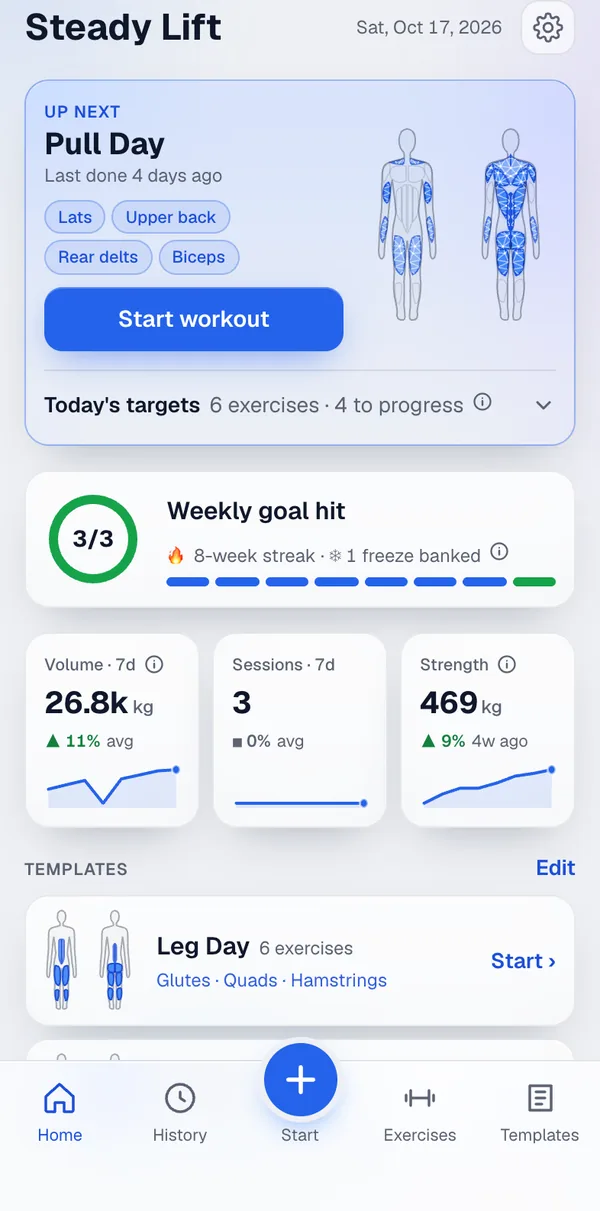
Pick up your next workout
Lift Log rotates your templates (Push, Pull, Legs) and loads today's targets before you reach the rack.
- 2
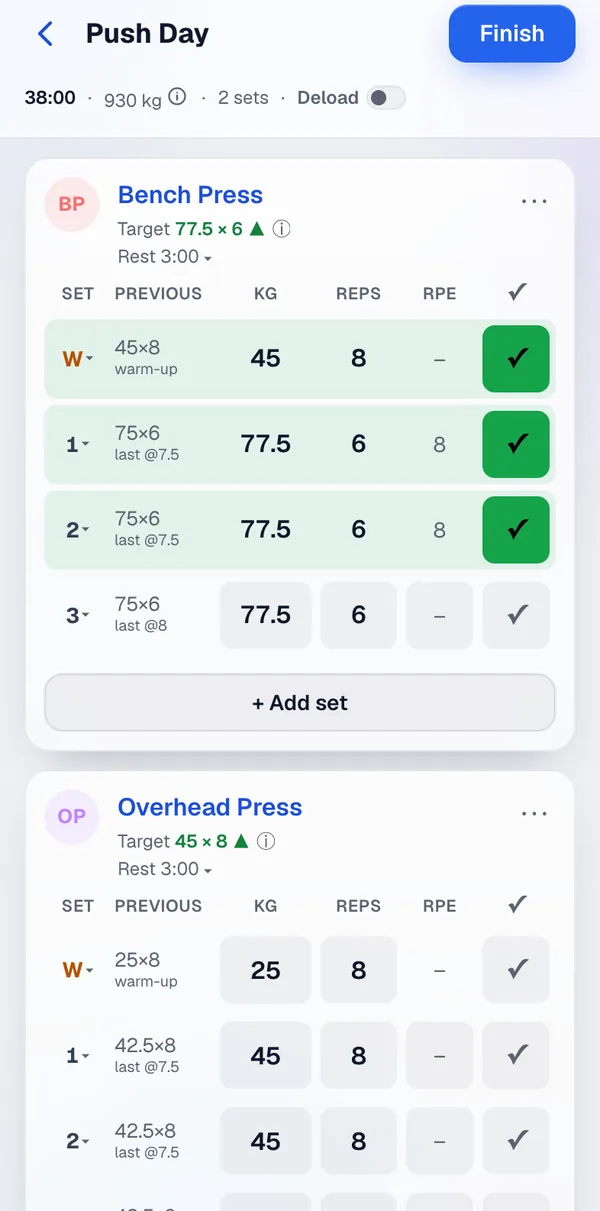
Log with one thumb
Tick a set and the rest timer starts. Adjust the weight or reps with a tap when the day calls for it.
- 3
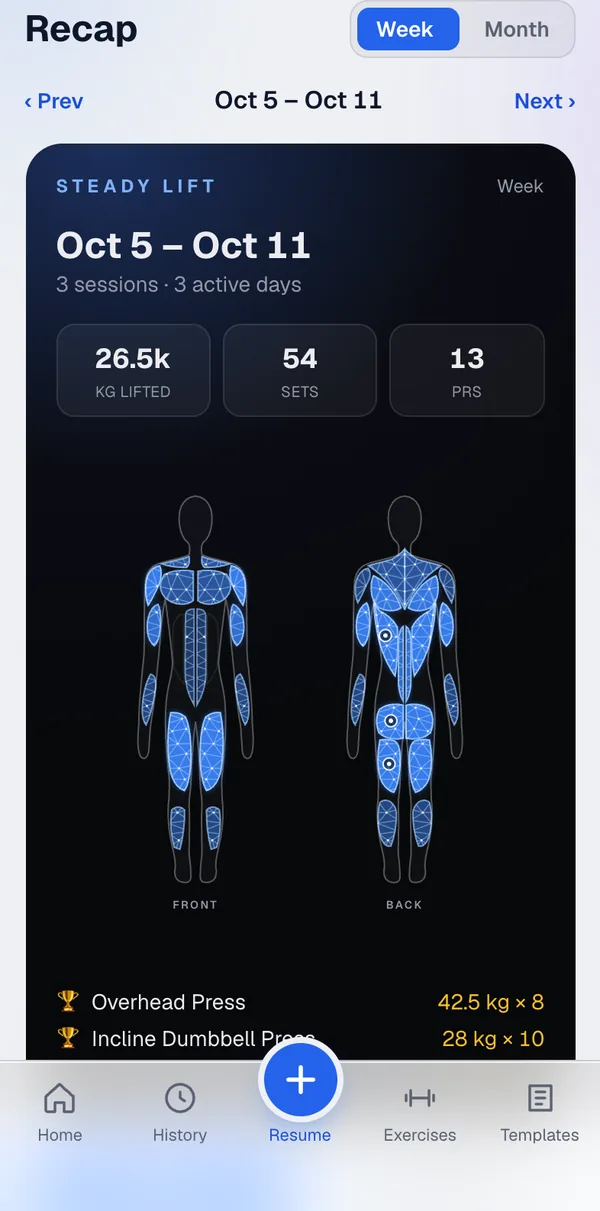
Watch it compound
Finish, and PRs, estimated 1RM and your weekly recap update straight away.


Works offline
Basement gym, no signal? Sets save on your phone and sync when you're back, with no duplicates.
Fix anything later
Typo in last Tuesday's session? Edit it, and every number downstream recalculates.
Switch without starting over
Import your Strong or Hevy history in one go and your first session already has targets. Export JSON or CSV whenever you like.
Today's weights, already worked out.
Built for one thing: making next week heavier than this one.
FAQ
Straight answers.
How does Lift Log decide my targets?
Double progression from your last session. Each set gets a target from your last session of that lift. Hit every rep and the weight goes up by the lift's smallest sensible step (2.5 kg on a barbell, 2 kg on dumbbells, half that for isolation work); miss and you repeat the weight and chase the reps. If you rate how hard a set felt (RPE, where 10 means nothing left), that fine-tunes it: an easy set (RPE 7 or below) earns a double step, a grinder (9.5 or above) holds.
What do I control?
Your program, entirely. Templates hold your exercises with sets and a rep goal per exercise; Lift Log fills in today's numbers, and every one is editable before you log it. Add your own exercises when the library lacks one, and RPE is optional: without it, progression goes on reps alone. Weight steps are fixed per lift type for now; there's no per-exercise override yet.
Can I bring my history from another app?
Yes. Import a CSV export from Strong or Hevy in Settings. Sessions already in Lift Log are skipped, exercise names are matched to the library (anything unmatched becomes a custom exercise), and RPE comes across if your export has it. Imported sessions count as history, so your first workout already gets targets. You can export everything as JSON or CSV at any time.
Does it work without signal?
Yes. Sets you log offline are kept on your phone and sync automatically when you're back online, without duplicates. Pages you've opened before load from the cache.
What does it run on?
iPhone: open it in Safari, tap Share → Add to Home Screen, and it runs full screen like an app; lock-screen rest alerts need iOS 16.4 or later. It's a web app, so Chrome on Android should install it the same way, but that hasn't been tested yet. Weights in kg or lbs, your choice in Settings.
What doesn't it do yet?
No Apple Watch app, no Apple Health sync, no plate calculator, no body-weight log. Custom exercises, supersets, set types and a 107-exercise library with form cues are in.
Where does my data live?
In a Postgres database on Railway, behind your own login. Nothing is shared or sold, and you can export all of it as JSON or CSV from Settings whenever you like.
What does it cost?
Nothing yet: it's a private app while it's being tested, so there's no pricing to announce.
Can I sign up?
Lift Log is invite-only. If you've been invited, sign in with your email from the top right; a six-digit code arrives by mail.